Over the coming weeks, we’re bringing a few tools together into Solutions , one place for the things that help you. You might know these as Activities , Unplanned or Problems .
In short
- Activities, Unplanned and Problems are coming together under Solutions.
- You can no longer create new Activities, Problems or Unplanned events but you can continue to use your existing ones for now.
- If you’d like to keep using your existing content in Brain in Hand, you’ll need to move it into Solutions. We’ll provide tools to help.
- You can also download a copy of your information using our export tool.
- We'll give plenty of notice and remind you before each step.
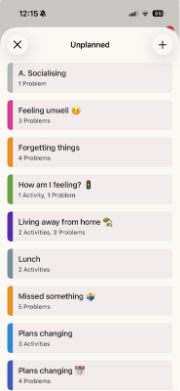
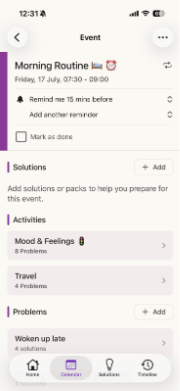
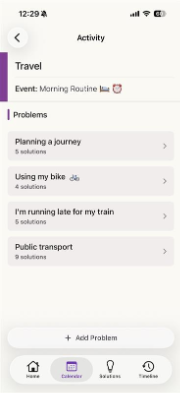
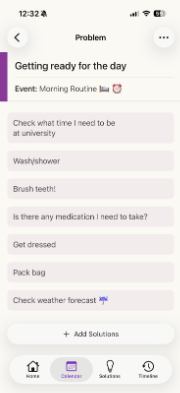
Today, Activities, Unplanned and Problems live in different places.
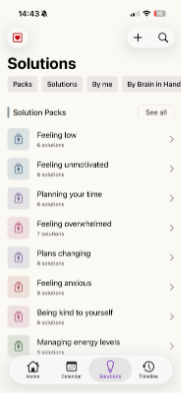
We're bringing them together in Solutions.
Why we’re making this change
Activities, Unplanned and Problems have grown separately over time. Bringing them together in Solutions makes it easier to:
- find what helps when you need it
- reuse the same solution in different situations
- keep everything in one place
It also lets us improve one experience, so new features arrive sooner.
What’s changing, and when
From early July You won't be able to create new Activities, Problems, or any new content in Unplanned. You can still use and edit everything you've saved.
From this point, you’ll also be able to:
- move your content into Solutions using our migration tool
- download a copy of your information using our export tool
From early August Activities, Unplanned and Problems will no longer be available in the app. Solutions becomes the main home for short, actionable items designed to help you. Your saved items won't move across automatically. If you'd like to keep anything, move it into Solutions. Migration and export tools will be available to help.
The migration and export tools will remain available in the web app for a period after early August.
We’ll keep you updated and remind you before each step. The aim is a gradual, well-supported move to one simpler place for your solutions.
Your options
If you’d like to keep using your existing content in Brain in Hand, you have two options.
Move your content into Solutions
Moving your content into Solutions means you can continue using it in Brain in Hand after Activities, Unplanned and Problems are retired.
The migration tool will:
- show you the content available to move
- explain how your content will appear in Solutions
- move your content into Solutions
To get started, launch the migration tool using the link below:
If you sign in to the Brain in Hand web app and have content available to move, you’ll also see a Move your content to Solutions card on your homepage.
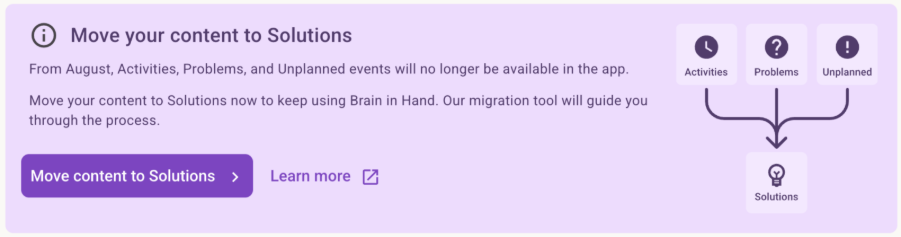
When you’re ready, simply select Move to Solutions to start the migration.
If you’re not ready, select Not now . You can come back and move your content at any time before the migration period ends.
If you’d like more detailed instructions, see our step-by-step guide to using the migration tool .
Export your information
If you’d like to keep a copy of your information, you can request an export from the Export User Data section of My Account in the Brain in Hand web app.
Your export includes your Activities, Unplanned and Problems, as well as your Solution Packs and Solutions.
To request an export:
- Sign in to the Brain in Hand web app.
- Open Manage Account .
- Scroll to Export User Data .
- Select Request Export .
For step-by-step instructions, see How to export your Brain in Hand information .
To learn what’s included in your export and how to read it, see Understanding your Brain in Hand export .
What happens to content you’ve saved
Items you’ve saved under Activities, Unplanned and Problems won’t move into Solutions automatically. You decide what to keep and how to organise it.
Until early August, everything works as normal.
After that:
- Activities, Unplanned and Problems will no longer be available in the app.
- Content you’ve moved into Solutions will continue to be available in Solutions.
- Migration and export tools will remain available through the web app for a limited period.
- Nothing is deleted straight away. We keep your information for a period afterwards, in line with our data retention policy, and we’ll give you notice before anything is removed for good.
Getting help
Change can feel unsettling, so support is available throughout.
You’ll find:
- step-by-step guidance here in the Help Centre
- tools to move your content into Solutions
- an option to download a copy of your information
- guidance to help you understand your export
You can also book time with a coach to talk through the changes and explore Solutions together.
Keep Brain in Hand up to date
We recommend keeping the Brain in Hand mobile app up to date throughout this change. Using the latest version helps ensure you receive the latest guidance, improvements and features, making your move to Solutions as smooth as possible.
You can check for updates here:
iPhone and iPad: Brain in Hand on the App Store
Android: Brain in Hand on Google Play
If you’re already using the latest version, there’s nothing you need to do.
Frequently asked questions
Will my content move automatically?
No. Your content won’t move into Solutions automatically. You’ll choose what you’d like to keep and when you’d like to move it.
Can I choose what gets moved?
No. The migration tool moves all your Activities, Problems and anything in Unplanned into Solutions in one go.
Before you start, you’ll see a summary of your content and examples of what will be moved, so you’ll know what to expect.
Can I move my content later?
Yes. If you’re not ready, choose Not now . You can come back and move your content at any time before the migration period ends.
Do I need to export my information?
No. Exporting is optional.
If you’d like to continue using your content in Brain in Hand, we recommend moving it into Solutions. Exporting gives you a copy of your information but doesn’t make it available in Solutions.
What happens if I don’t move my content?
Once Activities, Unplanned and Problems are removed from the app, you won’t be able to access them through the legacy screens.
The migration tool will remain available for a limited time, giving you an opportunity to move your content into Solutions. Once the migration period ends, self-service migration will no longer be available.
You can continue to export your Brain in Hand information using the export tool.
What happens if something goes wrong?
If something goes wrong while moving your content, your existing content won’t be changed.
We’ll automatically notify our support team so they can investigate. If we need you to do anything, we’ll let you know.
Will anything be deleted straight away?
No. We keep your information for a period afterwards in line with our data retention policy, and we’ll give you notice before anything is permanently removed.
Was this article helpful?
That’s Great!
Thank you for your feedback
Sorry! We couldn't be helpful
Thank you for your feedback
Feedback sent
We appreciate your effort and will try to fix the article
Can't find what you're looking for?
Contact us